Case study 05 · UX/UI redesign · Design thinking · n.d.
Southern Cross Travel Insurance: a shorter, clearer path to buying cover
A redesign of an online travel-insurance purchase journey, aimed at fewer steps, clearer navigation and more transparent coverage and costs.
- Role
- UX research synthesis, UX/UI design
- Challenge
- Make buying cover quick and understandable for people aged 18 to 60, without hiding the detail they need to trust the price.
- Type
- Redesign case study
- Process
- Empathise, define, ideate, design, test
- Audience
- Travellers aged 18 to 60

01 · What was redesigned, and why?
ConductedOverview and approach
This project redesigns the online purchasing journey for Southern Cross Travel Insurance. The aim was a more intuitive experience: fewer steps, a simpler interface and clearer navigation, so people spend less effort and finish more purchases.
I followed a five-stage design-thinking process: empathise, define, ideate, design and test.
The problem
The purchasing process was confusing and lengthy, causing frustration, abandonment and low conversion. The design had unnecessary steps and little clarity.
The solution
Simplify the flow by cutting steps, clarify navigation and add progress indicators, so the process is more intuitive and efficient.
The audience
People aged 18 to 60 who buy cover online and want it quick and clear.
02 · How would success be judged?
ConductedObjectives and success measures
The primary goal was to streamline the purchase process: reduce the number of steps, simplify the interface and make the journey more intuitive, improving engagement and conversion.
These are the proposed evaluation measures. No baseline or post-redesign data exists, so they describe how success would be measured, not results.
Purchase conversion rate
Share of quote starts that become purchases.
Checkout abandonment
Where and how often people leave the flow.
Time to complete
How long a purchase takes.
Task completion rate
Whether people finish unaided.
Customer satisfaction
How people rate the experience.
Support enquiries
Contacts caused by purchase-flow confusion.
03 · How was the work sequenced?
HypothesisTimeline
A four-week sequence from empathise through to test, with prototyping overlapping ideation and testing. It is illustrative of the plan, not a record of a confirmed schedule.
Week 1
Week 2
Week 3
Week 4
- Empathise
- Define
- Ideate
- Prototype
- Test
04 · Where was the friction?
ConductedQuantitative research
I started from user feedback, surveys and web analytics to find the pain points in the existing purchase process. Users were frustrated by a lengthy, confusing flow, which led to abandonment and lower conversion. Six themes emerged, shown here as qualitative themes rather than figures.
Too many steps
The process was lengthy, leading to frustration and abandonment.
Lack of clarity
Unclear instructions and form fields made it hard to know what was needed.
No progress indicators
Without visual cues, people could not tell how much longer it would take.
Repetitive requests
Users were asked for the same information more than once.
Unnecessary steps
Extra steps made the process feel inefficient.
Confusing navigation
People struggled to see where they were in the process.
05 · Who is this for?
ConductedPersona
Tom stands in for the research themes: a frequent traveller who wants to get cover sorted fast and needs to see coverage and cost clearly. He is a synthesis used to keep design decisions grounded, not a real participant.
Tom
The Young Professional Traveller
- Age
- 28
- Occupation
- Software developer
- Status
- Single
- Education
- Master's degree
Tom travels frequently for work and leisure. He values quick, easy and clear online processes.
- Talkative
- Optimistic
- Friendly
- Empathetic
“I want to get my insurance sorted fast so I can focus on enjoying my trip.”
Goals and needs
- Complete the purchase quickly with minimal steps
- Understand coverage and costs clearly
Pain points
- Too many steps; the process feels lengthy
- Key information is hard to find quickly
Frustrations
- Unclear instructions make the process hard to navigate
- Repeated requests for the same information
Motivation
- Wants a fast, simple process
- Seeks transparency to get the best coverage
06 · What is Tom thinking and feeling?
HypothesisEmpathy map
The map organises what Tom says, thinks, does and feels, to design around his needs rather than the form's structure. It captures a working understanding to be checked with real users, not a measured result.
Says
- “I need to sort my insurance quickly and get on with my trip.”
- “Why is this taking so long? It should be easier.”
Thinks
- “I don't want to waste time on this process.”
- “I just want clear, simple options with no confusion.”
Does
- Skips steps if the process feels too long
- Quickly scans for key information and prices
Feels
- Frustrated by the lengthy process
- Annoyed by unclear instructions and repeated requests
07 · What could fix it?
ConductedIdeation
Brainstorming generated a wide range of ideas from the pain points, and sketching turned the promising ones into something visual and practical. Nine ideas grouped into three pillars: simplify the process, improve navigation and enhance clarity.
Simplifying the process
- Reduce the number of steps in the checkout flow
- Auto-fill user information from previous visits
- Offer a “Quick Buy” option for returning users
Improving navigation
- Use clear progress indicators throughout
- Implement sticky navigation for key sections
- Add a “Back to top” button
Enhancing clarity
- Use simple, non-technical language
- Provide tooltips or pop-ups for extra help
- Show a clear breakdown of coverage and costs at each step
08 · Where does it break down?
HypothesisUser journey
The journey maps four steps: get a quote, choose a plan, add travellers and declare medical conditions. It shows how the experience is expected to go from confident to overwhelmed. The feelings are hypothesised and would need validating with real users.
| Step 1 Get quote | Step 2 Plans | Step 3 Travellers | Step 4 Medical | |
|---|---|---|---|---|
| User action | Fills in age, destination and travel dates | Browses and selects the plan that suits their needs | Selects the number of travellers (individual or group) | Enters any pre-existing medical conditions |
| User goal | Receive an accurate quote | Choose a plan that fits the trip and budget | Make sure all travellers are covered | Be properly covered in a medical emergency |
| Feeling | Positive, excited | Frustrated | Stressed, overwhelmed | Stressed, overwhelmed |
| Thinking |
|
|
|
|
| Ideas |
|
|
|
|
09 · How does the flow work?
ConductedMid-fidelity wireframes
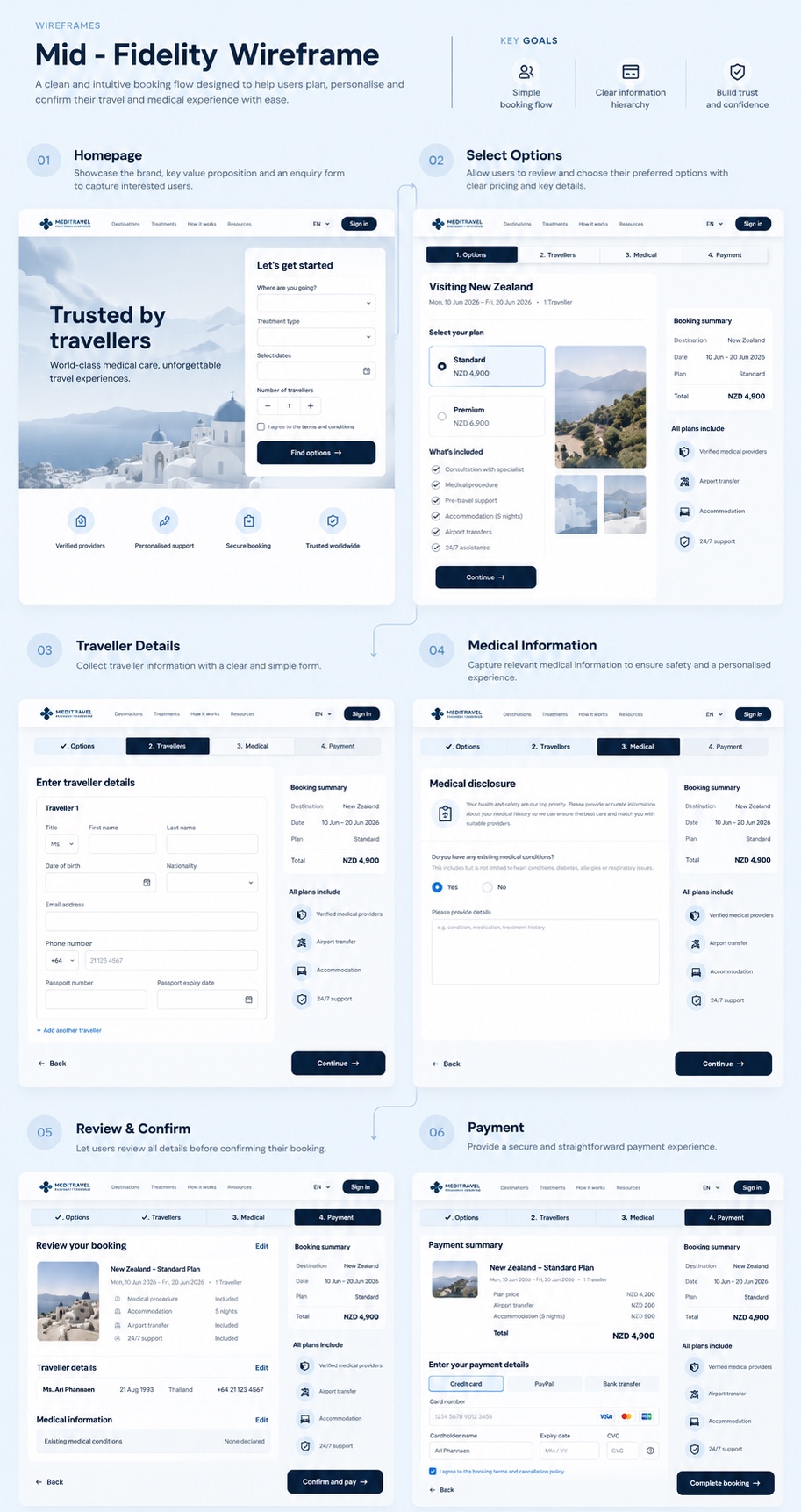
A clean, intuitive booking flow designed to help people plan, personalise and confirm their trip and medical details with ease. The wireframes set out six steps, with three goals throughout: a simple booking flow, a clear information hierarchy, and trust and confidence.
Homepage
Shows the brand and value proposition, with an enquiry form to capture interest.
Select options
Lets people review and choose their plan, with clear pricing and key details.
Traveller details
Collects traveller information in a clear, simple form.
Medical information
Captures relevant medical details to ensure safety and personalised cover.
Review and confirm
Lets people check every detail before confirming.
Payment
A secure, straightforward payment step.
10 · What did it become?
ConductedFinal design
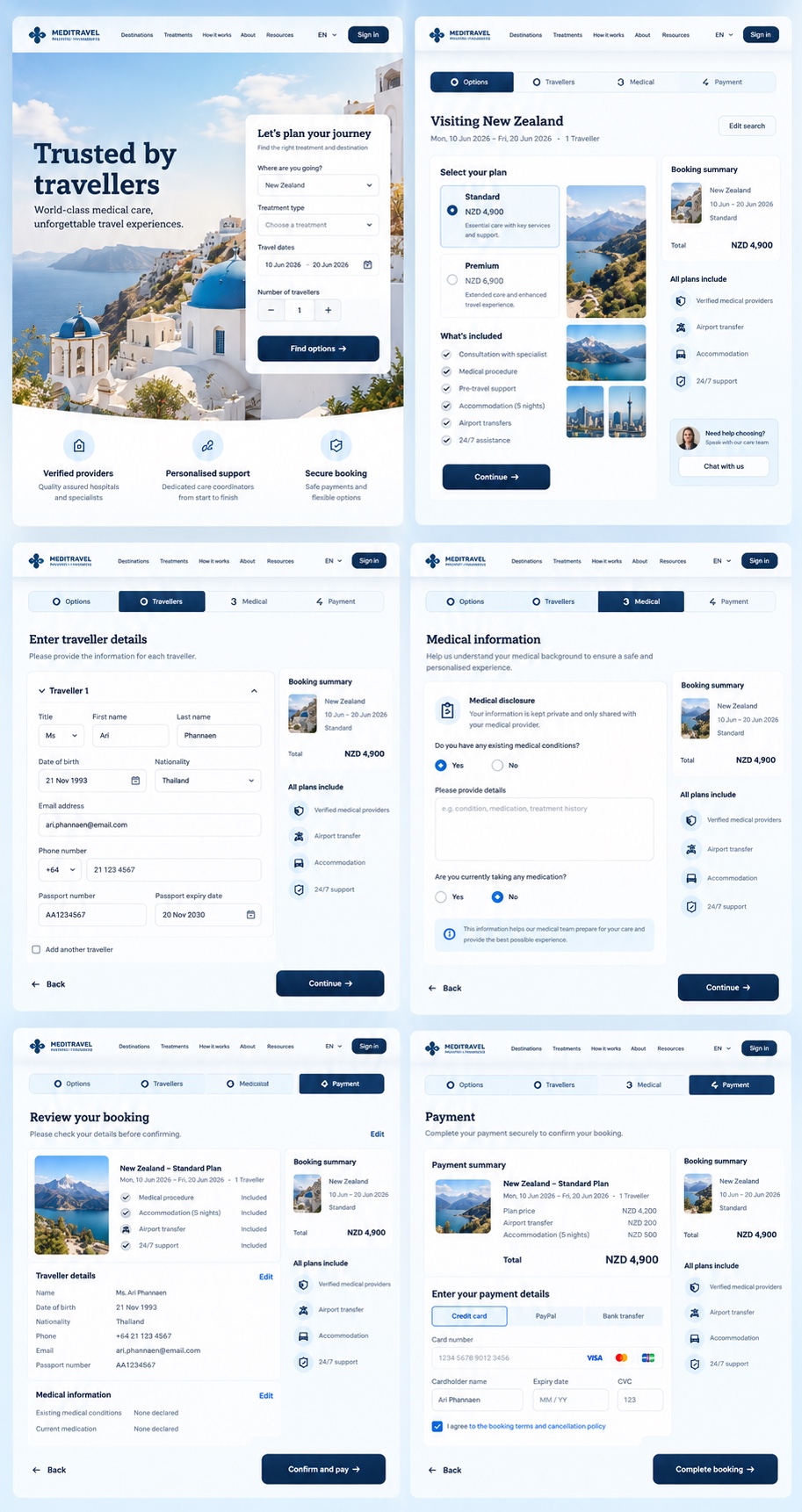
The finished booking flow: a homepage with a short enquiry form, plan selection with clear pricing, traveller details, a medical disclosure, a review step and payment. A step bar and a booking summary stay visible throughout, so people always know where they are and what they are paying.
11 · How is it kept consistent?
ConductedDesign system
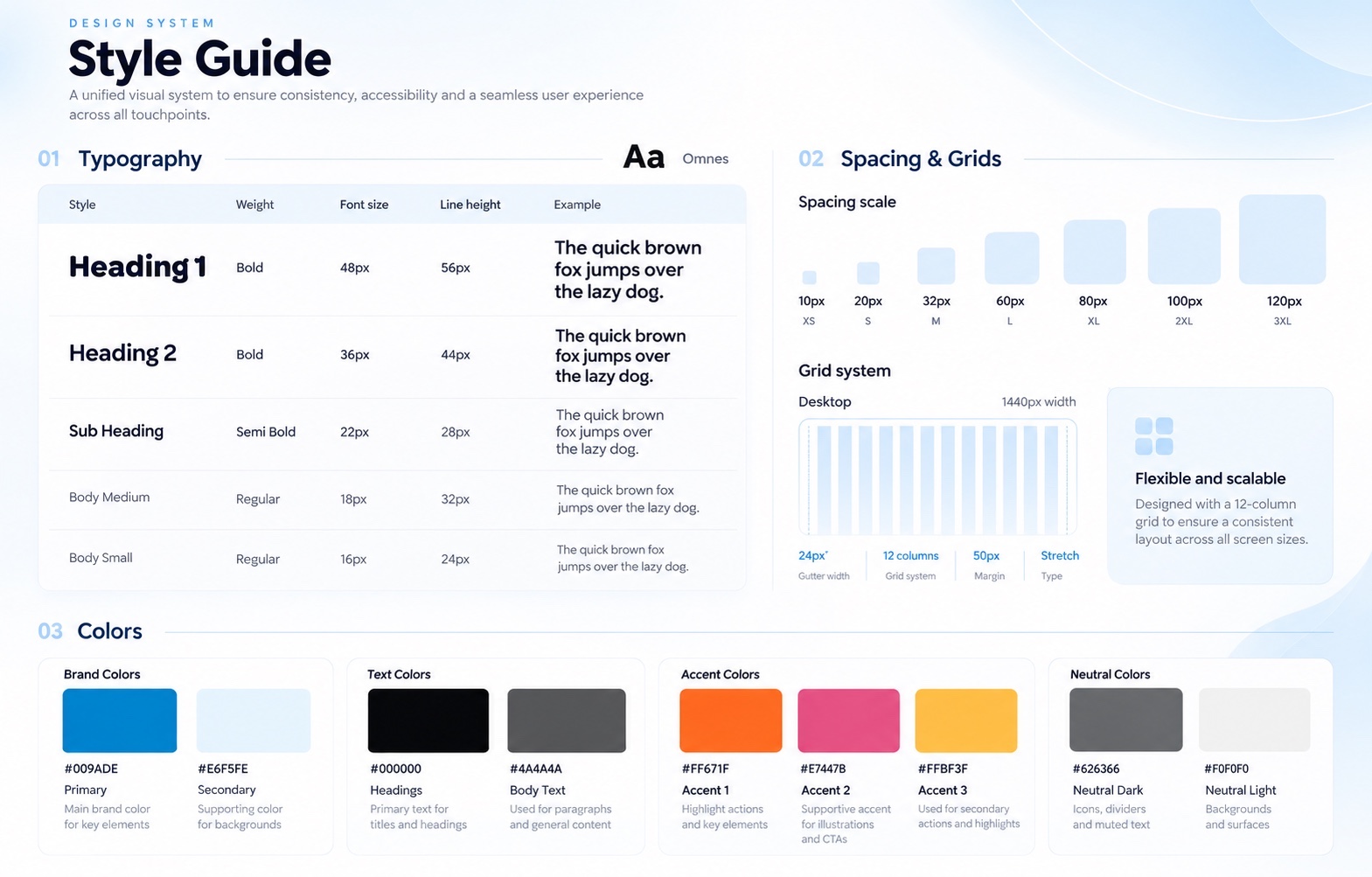
A unified visual system keeps the purchase flow consistent, accessible and seamless across every touchpoint: one type scale, a spacing and grid system, and a clear set of brand, text, accent and neutral colours.
Outcomes
What came out of it.
- Demonstrates
A full design-thinking process from research synthesis to ideation and journey mapping, with success measures defined before any design work.
Next case study
Southern Cross Travel Insurance: blog navigation
Read nextWorking on something similar?
Get in touch